
文章插图
实现了基本的socket通信(即两台设备 , 一台用作服务器 , 一台用作客户端) , 服务器进行监听 , 客户端发送加密数据到服务器 , 服务器进行解密得到明文 。
注意:本项目中使用了ButterKnife及EventBus作为辅助工具 , 通信建立时默认网络正常(未做局域网网络环境检测) , 加密方式为AES加密
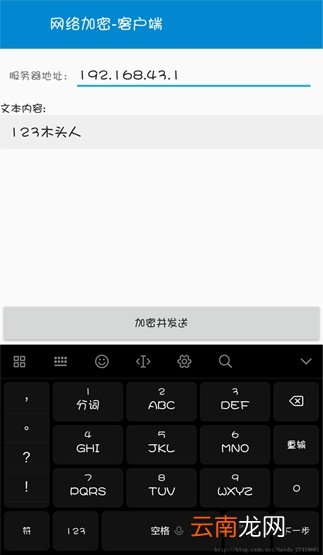
1.效果图:
(1)客户端
文章插图
(2)服务器端

文章插图
2.界面布局部分
(1)服务器端布局 function_socket_server.xml
?
1
2
3
4
5
6
7
8
9
10
11
12
13
14
15
16
17
18
19
20
21
22
23
24
25
26
27
28
29
30
31
32
33
34
35
36
37
38
39
40
41
42
43
44
45
46
47
48
49
50
51
52
53
54
55
56
57
58
59
60
61
62
63
64
65
66
67
68
69
70
71
72
73
74
75
76
77
78
79
80
81
82
83
84
85
86
87
88
89
90
91
92
93
94
95
96
97
98
99
100
101
102
<?xml version="1.0" encoding="utf-8"?><LinearLayout xmlns:android="http://schemas.android.com/apk/res/android"android:layout_width="match_parent"android:layout_height="match_parent"android:orientation="vertical"><RelativeLayout style="@style/ToolBar"><TextViewstyle="@style/ToolBar_tv_Title"android:text="网络加密-服务器端" /></RelativeLayout><LinearLayoutandroid:layout_width="match_parent"android:layout_height="wrap_content"android:orientation="horizontal"><Buttonandroid:id="@+id/btn_startListener"android:layout_width="0dp"android:layout_height="wrap_content"android:layout_weight="1"android:text="启动监听" /><Buttonandroid:id="@+id/btn_stopListener"android:layout_width="0dp"android:layout_height="wrap_content"android:layout_weight="1"android:text="停止监听" /><Buttonandroid:id="@+id/btn_getUser"android:layout_width="0dp"android:layout_height="wrap_content"android:layout_weight="1"android:text="刷新用户" /></LinearLayout><LinearLayoutandroid:layout_width="match_parent"android:layout_height="wrap_content"android:orientation="horizontal"android:padding="10dp"><TextViewandroid:layout_width="wrap_content"android:layout_height="wrap_content"android:text="本机地址:" /><TextViewandroid:id="@+id/tv_localAddress"android:layout_width="match_parent"android:layout_height="wrap_content"android:singleLine="true" /></LinearLayout><ScrollViewandroid:layout_width="match_parent"android:layout_height="match_parent"><LinearLayoutandroid:layout_width="match_parent"android:layout_height="wrap_content"android:orientation="vertical"><TextViewandroid:layout_width="wrap_content"android:layout_height="wrap_content"android:text="接收到的明文:"android:textColor="@color/black" /><TextViewandroid:id="@+id/tv_receivedContent"android:layout_width="match_parent"android:layout_height="match_parent"android:padding="10dp" /><TextViewandroid:layout_width="wrap_content"android:layout_height="wrap_content"android:text="解密后的明文:"android:textColor="@color/black" /><TextViewandroid:id="@+id/tv_decryptContent"android:layout_width="match_parent"android:layout_height="match_parent"android:padding="10dp" /></LinearLayout></ScrollView></LinearLayout>(2)客户端布局 function_socket_client.xml
?
1
2
3
4
5
6
7
8
9
10
11
12
13
14
15
16
17
18
19
20
21
22
23
24
25
26
27
28
29
30
31
32
33
34
35
36
37
38
39
40
41
42
43
44
45
46
47
48
49
50
51
52
53
54
55
56
57
58
59
60
61
62
63
64
65
66
67
68
<?xml version="1.0" encoding="utf-8"?><LinearLayout xmlns:android="http://schemas.android.com/apk/res/android"android:layout_width="match_parent"android:layout_height="match_parent"android:orientation="vertical"><RelativeLayout style="@style/ToolBar"><TextViewstyle="@style/ToolBar_tv_Title"android:text="网络加密-客户端" /></RelativeLayout><LinearLayoutandroid:layout_width="match_parent"android:layout_height="wrap_content"android:orientation="horizontal"android:padding="10dp"><TextViewandroid:layout_width="wrap_content"android:layout_height="wrap_content"android:text="服务器地址:" /><EditTextandroid:id="@+id/edtTxt_serverAddress"android:layout_width="match_parent"android:text="192.168.43.1"android:layout_height="wrap_content"android:singleLine="true" /></LinearLayout><ScrollViewandroid:layout_width="match_parent"android:layout_height="0dp"android:layout_weight="1"><LinearLayoutandroid:layout_width="match_parent"android:layout_height="wrap_content"android:orientation="vertical"><TextViewandroid:layout_width="wrap_content"android:layout_height="wrap_content"android:text="文本内容:"android:textColor="@color/black" /><EditTextandroid:id="@+id/edtTxt_Content"android:layout_width="match_parent"android:layout_height="match_parent"android:background="@color/main_background"android:padding="10dp"android:text="123木头人" /></LinearLayout></ScrollView><Buttonandroid:id="@+id/btn_encryptAndSend"android:layout_width="match_parent"android:layout_height="wrap_content"android:layout_gravity="bottom"android:text="加密并发送" /></LinearLayout>(3)用到的style
?
1
2
3
4
5
6
7
8
9
10
11
12
13
14
15
16
17
18
19
20
21
22
<!--通用Title的右侧按钮--><style name="ToolBar_iv_Right"><item name="android:layout_width">@dimen/toolbar_icon_dimen</item><item name="android:layout_height">@dimen/toolbar_icon_dimen</item><item name="android:layout_alignParentRight">true</item><item name="android:layout_gravity">end</item><item name="android:clickable">true</item><item name="android:background">?android:actionBarItemBackground</item><item name="android:padding">15dp</item></style><!--通用Title的TextView--><style name="ToolBar_tv_Title"><item name="android:layout_width">wrap_content</item><item name="android:layout_height">wrap_content</item><item name="android:layout_centerVertical">true</item><item name="android:layout_marginLeft">@dimen/toolbar_title_haveBack_marginStart</item><item name="android:layout_marginRight">@dimen/toolbar_title_haveBack_marginEnd</item><item name="android:gravity">center</item><item name="android:singleLine">true</item><item name="android:textColor">@color/white</item><item name="android:textSize">20sp</item></style>3.功能代码
(1)基类 BaseEventActivity.Java
?
1
2
3
4
5
6
7
8
9
10
11
12
13
14
15
16
17
18
19
20
21
22
23
24
25
26
27
28
29
30
31
import android.os.Bundle;import android.support.v7.app.AppCompatActivity;import org.greenrobot.eventbus.EventBus;import butterknife.ButterKnife;public abstract class BaseEventActivity extends AppCompatActivity {@Overridepublic void onCreate(Bundle savedInstanceState) {super.onCreate(savedInstanceState);getIntentData();setContentView(getLayoutResId());ButterKnife.bind(this);EventBus.getDefault().register(this);init();}protected void getIntentData() {}@Overrideprotected void onDestroy() {super.onDestroy();EventBus.getDefault().unregister(this);}protected abstract void init();protected abstract int getLayoutResId();}(2)服务器主界面 Function_Socket.java
?
1
2
3
4
5
6
7
8
9
10
11
12
13
14
15
16
17
18
19
20
21
22
23
24
25
26
27
28
29
30
31
32
33
34
35
36
37
38
39
40
41
42
43
44
45
46
47
48
49
50
51
52
53
54
55
56
57
58
59
60
61
62
63
64
65
66
67
68
69
70
71
72
73
74
75
76
77
78
79
80
81
82
83
84
85
86
87
88
89
90
91
92
93
94
95
96
97
98
99
100
101
102
103
104
105
106
107
108
109
110
111
112
113
114
115
116
117
118
119
120
121
122
123
124
125
126
import android.content.ComponentName;import android.content.Intent;import android.content.ServiceConnection;import android.os.IBinder;import android.view.View;import android.widget.TextView;import org.greenrobot.eventbus.Subscribe;import org.greenrobot.eventbus.ThreadMode;import java.io.BufferedReader;import java.io.FileReader;import java.util.ArrayList;import butterknife.BindView;import butterknife.OnClick;/*** 服务器界面*/public class Function_Socket_Server extends BaseEventActivity {@BindView(R.id.tv_localAddress)TextView tv_localAddress;@BindView(R.id.tv_receivedContent)TextView tv_receivedContent;@BindView(R.id.tv_decryptContent)TextView tv_decryptContent;private LocalService localService;//用于启动监听的服务private ServiceConnection sc;//服务连接@Overrideprotected void init() {tv_localAddress.setText(ToolUtil.getHostIP());sc = new ServiceConnection() {@Overridepublic void onServiceConnected(ComponentName name, IBinder service) {LocalService.LocalBinder localBinder = (LocalService.LocalBinder) service;localService = localBinder.getService();localService.startWaitDataThread();ToastUtil.showToast(Function_Socket_Server.this, "监听已启动");}@Overridepublic void onServiceDisconnected(ComponentName name) {}};connection();}@Subscribe(threadMode = ThreadMode.MAIN)public void getData(String data) {tv_receivedContent.setText(data);tv_decryptContent.setText(AESUtil.decrypt(ConstantUtil.password, data));}/*** 绑定service*/private void connection() {Intent intent = new Intent(this, LocalService.class);bindService(intent, sc, BIND_AUTO_CREATE);}@Overrideprotected int getLayoutResId() {return R.layout.function_socket_server;}/*** 获取连接到本机热点上的手机ip*/private ArrayList<String> getConnectedIP() {ArrayList<String> connectedIP = new ArrayList<>();try {//通过读取配置文件实现BufferedReader br = new BufferedReader(new FileReader("/proc/net/arp"));String line;while ((line = br.readLine()) != null) {String[] splitted = line.split(" +");if (splitted.length >= 4) {String ip = splitted[0];connectedIP.add(ip);}}} catch (Exception e) {e.printStackTrace();}return connectedIP;}@OnClick({R.id.btn_startListener, R.id.btn_stopListener, R.id.btn_getUser})public void onClick(View v) {switch (v.getId()) {case R.id.btn_startListener://启动监听connection();break;case R.id.btn_stopListener://停止监听if (sc != null)unbindService(sc);break;case R.id.btn_getUser://刷新连接到此设备的IP并清空之前接收到的数据ArrayList<String> connectedIP = getConnectedIP();StringBuilder resultList = new StringBuilder();for (String ip : connectedIP) {resultList.append(ip);resultList.append("\n");}ToastUtil.showToast(this, "连接到手机上的Ip是:" + resultList.toString());tv_decryptContent.setText("");tv_receivedContent.setText("");break;}}public void onDestroy() {super.onDestroy();if (sc != null)unbindService(sc);}【android基于socket的局域网内服务器与客户端加密通信】
}- Android Studio快捷键如何设置 常用快捷键设置方法介绍
- 怎么扫全家福
- Android Studio如何删除项目 删除模块和项目方法说明
- 解决安卓手机出现“android.process.media已停止运行”的方法
- Android Studioryhe1删除项目? 删除模块和项目方法分享
- 腾讯关闭苹果虚拟支付是什么意思
- 迅雷的下载文件夹在哪
- Windows Vista升级顾问
- 为Vista作好准备:购买新PC及查找徽标
- 小米手机怎么用LHDC